Step 1
Find the solo
Mark it on the overview and place its edges on the detail view. Check the bar grid by eye and by ear, and slow the music down without changing its pitch.
Free jazz solo transcription
SwingScribe turns a jazz record into a solo transcription you would actually play from. Mark the solo, and it pulls the soloist out of the band, finds every beat and bar, and hears every note. Then it writes a clean lead sheet, with swung eighths written as eighths under a Swing marking. It runs on your own computer, and it is free.
About 450 MB · Windows 10 and 11 · 8 GB RAM · No GPU needed · Linux from source · MIT licence
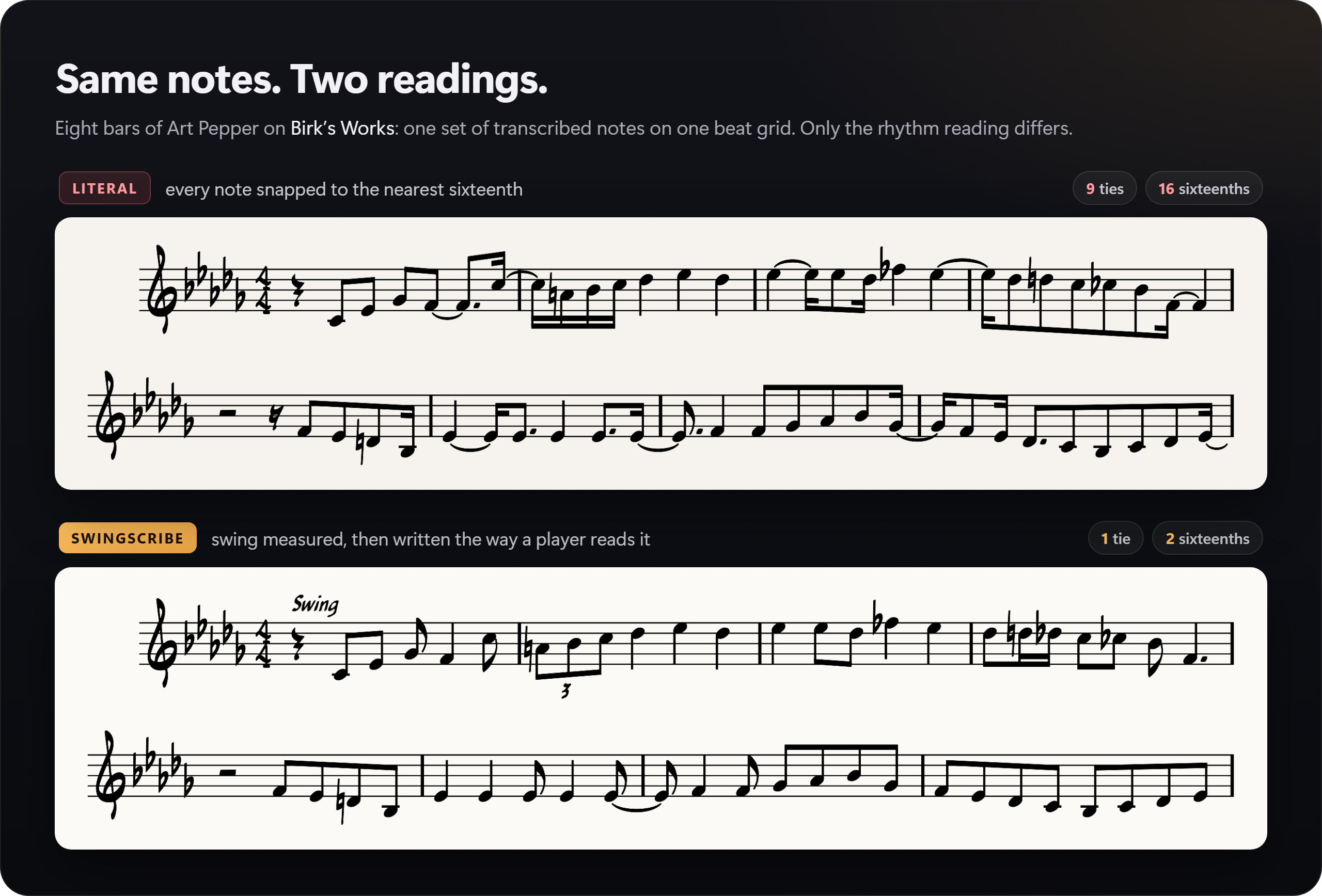
Most automatic transcription writes down exactly what it measures, and in jazz that is the wrong answer. Swung eighths come out as triplets or dotted rhythms, a laid-back soloist lands a sixteenth late, and the page fills with ties. SwingScribe measures the swing and the lay-back first, then writes what a transcriber would.
Everything between the record and a page you can open in your notation program, with you in charge at every step.
It measures how hard each passage swings and how far the soloist sits behind the beat. Then it writes eighths as eighths and keeps the triplets that were really played, guided by statistics from 245 human jazz transcriptions. Want it exactly as played instead? A literal page in sixteenths is one menu away.
A state-of-the-art AI model lifts the horn or piano out of the full mix, over just the passage you picked. You can compare it with the original before a note is written.
The bar grid is drawn over the waveform before you transcribe, with a click track to check it by ear. If the downbeat is wrong, one keypress moves it.
A dedicated piano model hears every key a pianist strikes, and SwingScribe picks the melody out of the chords. Switch on any other note it heard to write a chord, or write everything it heard, both hands, on treble and bass staves.
Every note sits on a piano roll with the evidence behind it. Silence whatever belongs to another instrument. Your edits survive a re-transcription.
There are no accounts, uploads or subscriptions. It exports MusicXML for MuseScore, Finale, Sibelius or Dorico, transposed for B♭ and E♭ horns.
Four research-grade neural networks and one engine of its own.
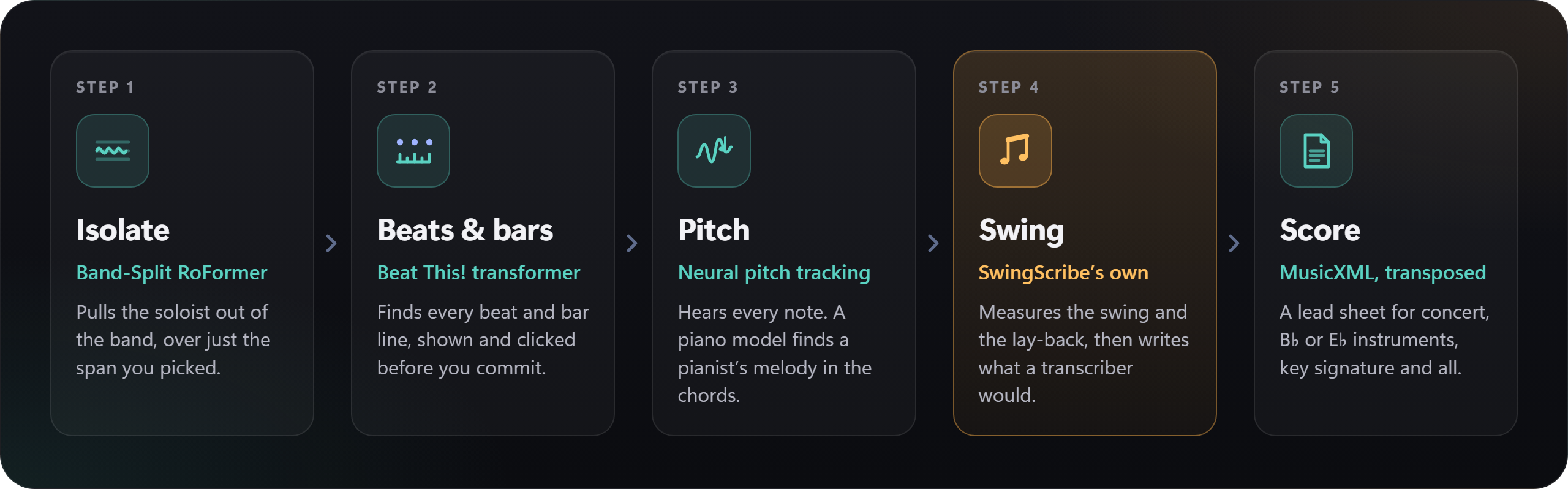
Band-Split RoFormer took first place in the music separation track of the 2023 Sound Demixing Challenge. It keeps a saxophone in one piece where older separators tear it between stems. Demucs is one click away when speed matters more.
Beat This! is a transformer beat tracker from JKU Linz (ISMIR 2024). SwingScribe repairs its dropped and doubled beats into a bar grid you can steer.
A deep convolutional network, CREPE, reads the soloist's pitch a hundred times a second. SwingScribe keeps the soloist and rejects what leaked in from the band. For a piano solo, high-resolution piano transcription hears every note, and SwingScribe picks the melody out of the comping.
SwingScribe's rhythm engine is the part you will not find anywhere else. It measures the swing section by section and removes the soloist's lag behind the band. Then it reads each beat at the simplest rhythm the notes support.
Open the result in MuseScore, Finale, Sibelius or Dorico, in the key SwingScribe detects or one you choose, at concert pitch or transposed for B♭ and E♭ instruments.
Three panels take you from a whole record to a finished page.
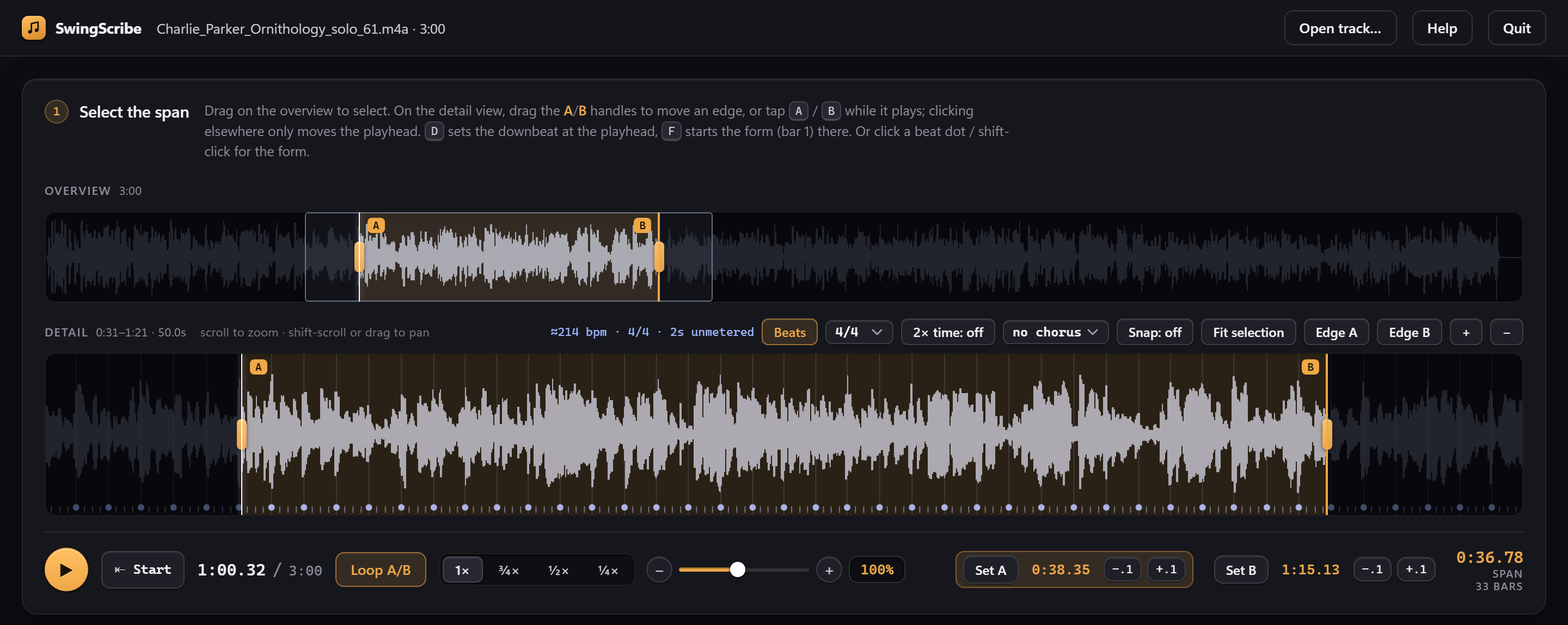
Step 1
Mark it on the overview and place its edges on the detail view. Check the bar grid by eye and by ear, and slow the music down without changing its pitch.
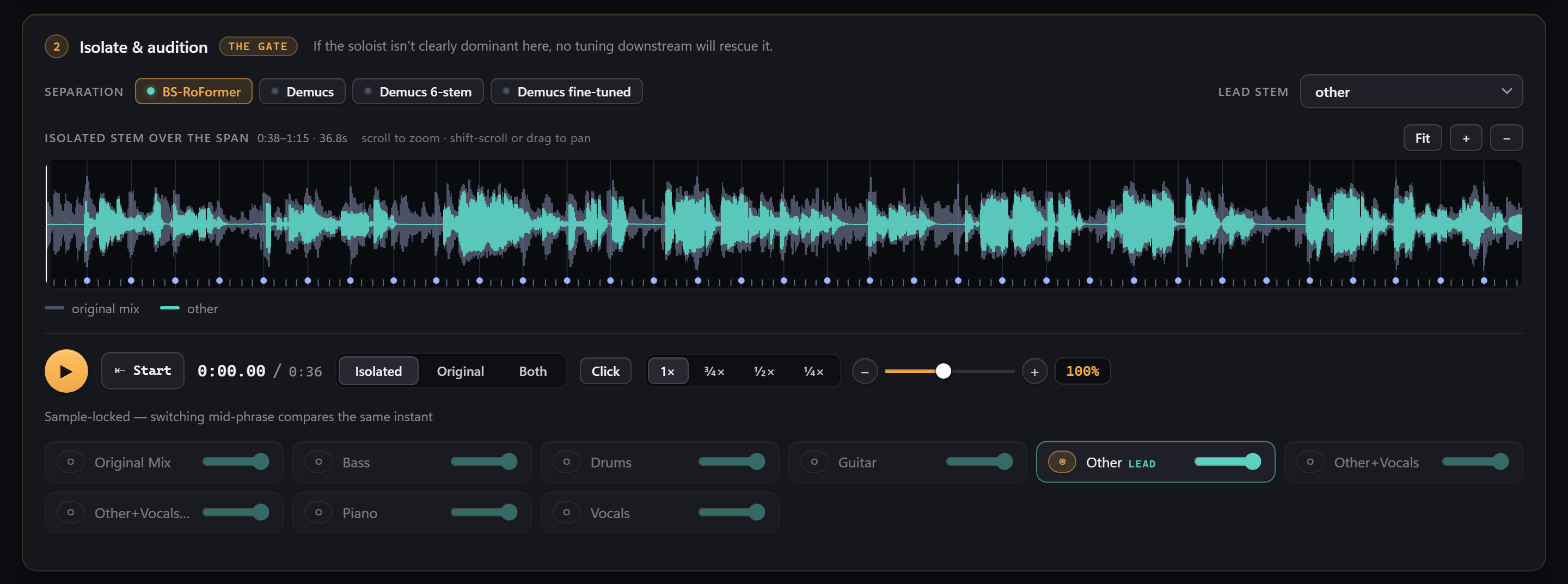
Step 2
Switch between the isolated instrument and the original mid-phrase. Playback is sample-locked, and every stem has its own fader.
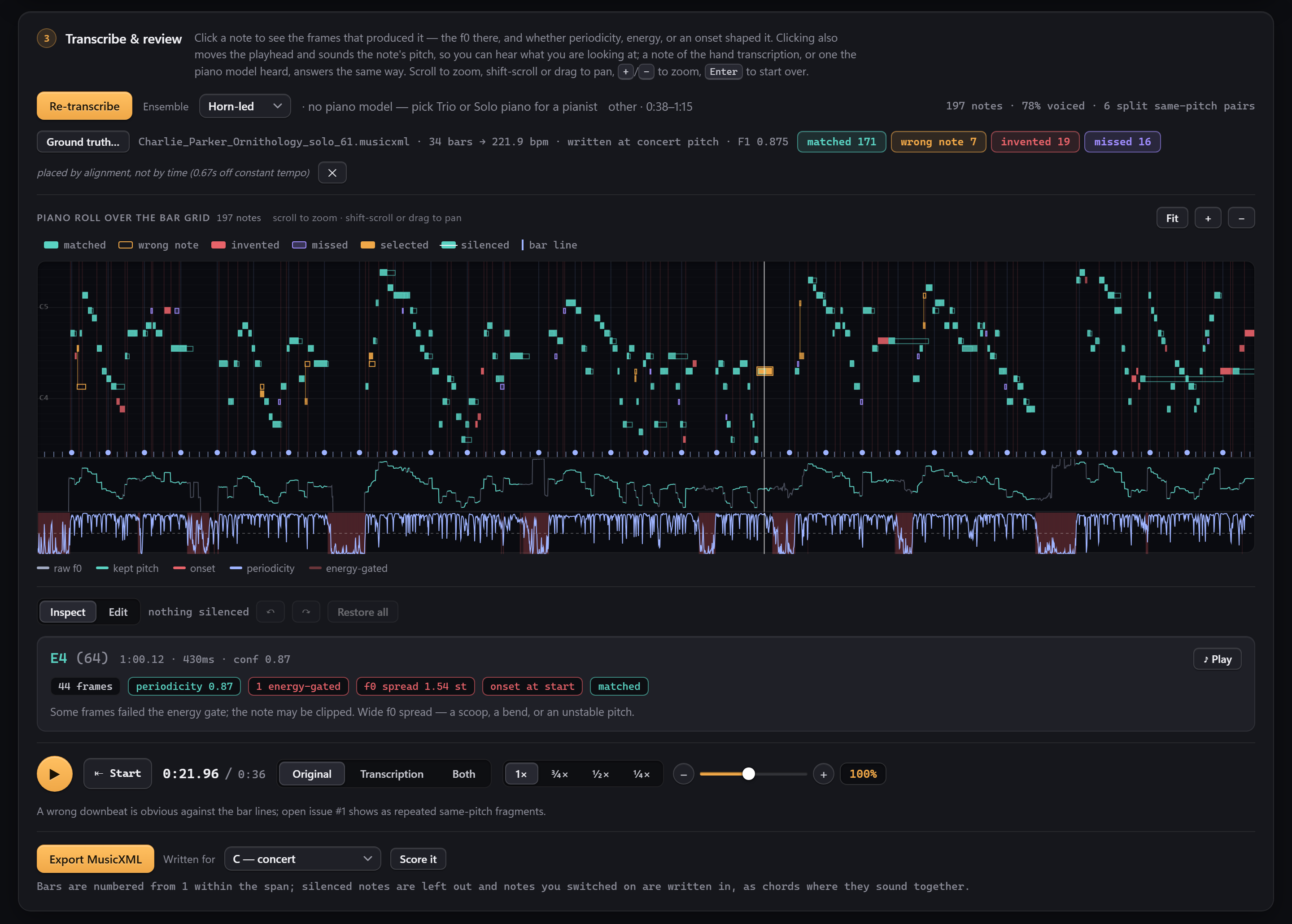
Step 3
Click any note to hear it and see why it was written. Load a hand transcription and every note is marked as matched, wrong, missed or invented.
Everything runs on your own computer. No account is needed, no audio leaves your machine, and a GPU is not required.
A ready-to-run folder that holds everything the app needs, including its own Python. You need Windows 10 or 11 (64-bit), 8 GB of RAM (16 GB recommended) and about 2.5 GB of free disk.
C:\SwingScribe.setup.cmd once.Updating from an earlier version? Install the new one beside the old folder, never over it. The installation guide has the steps, and your models, cache and settings carry over.
On Windows or Linux, with uv and 8 GB of RAM (16 GB recommended). macOS is untested.
git clone https://github.com/elkayem/swingscribe.git
cd swingscribe
uv sync --group ml --group gui --group roformer
uv run python -m swingscribe gui
The installation guide covers both routes in detail, and the user guide covers every control. There is also a command line for every step, so you can script a batch of solos.
Yes. It is open source under the MIT licence, with no accounts or subscriptions. The AI models download on first use under their own licences, listed in NOTICES.md. The default separator's weights were published by the community with no stated licence, so for commercial work choose Demucs (MIT) in the separator menu.
No. SwingScribe runs entirely on your computer. It opens in your browser, but the page is served by the app itself, and your recordings never leave your machine.
Single-line horn solos, such as saxophone, trumpet and trombone, and piano solos, which get a dedicated piano model. You tell it who is playing, and it writes the soloist's line.
A MusicXML file of the solo, with bar lines, a key signature and the swing written the way players read it, or a literal rhythm if you prefer. A pianist can be written on two staves. MuseScore, Finale, Sibelius and Dorico all open it, and it can be transposed for B♭ and E♭ instruments.
Minutes. Most of the time goes into isolating the soloist, and SwingScribe does that over just the passage you selected, not the whole track. Demucs is a faster separator when speed matters more than quality.
Treat it as a first draft that you check. Every note sits on a piano roll with the evidence behind it, so you can hear any note, and erase what does not belong, before you export.